
Connection kinds and the role ceiling
Limit each person to a ClickHouse role: the empty login, the role map, the system role, the checks CHouse UI runs, and how to switch a connection.
- In the app
- Admin › Connections
/admin/connections - Needs
- connections:edit
Every connection has a kind. It decides which ClickHouse identity a statement runs with, and so what ClickHouse itself will refuse.
| Kind | The stored ClickHouse user | What limits a person |
|---|---|---|
| Shared login (the default) | Holds every grant CHouse UI needs | CHouse UI's permissions and data access rules |
| Role ceiling | Holds no grant of its own, only ClickHouse roles | The same checks, and under them the ClickHouse role mapped to the person's CHouse role |
| Personal | Holds no grant of its own; it may act as the ClickHouse users linked to accounts | The person's own ClickHouse user. See Personal connections |
Every existing connection is a shared login and behaves as before. Only a super admin can see or change a connection's kind.
Why use the role ceiling
On a shared login, CHouse UI's own checks are the only thing between a person and every table the login can reach. With the role ceiling, ClickHouse enforces a second boundary: each statement is sent with one ClickHouse role, and ClickHouse refuses anything that role is not granted, even if a check in CHouse UI were wrong.
It needs ClickHouse 24.4 or newer: older servers do not take a role on a request, and CHouse UI refuses to switch a connection on them.
How it works
- The stored ClickHouse user is empty: no direct grant and no default role. A request that names no role reads nothing, which protects against an older CHouse UI version, an old replica during an update, or a code path that forgets the role.
- A role map says which ClickHouse role each CHouse role uses on the connection. A person's statements are sent with the ClickHouse role mapped to their CHouse role. Administrators get their mapped role like everyone else.
- CHouse UI's own work (monitoring, collectors, live queries, stopping a query, the access check's parse) is sent with the system role.
- A person whose role is not mapped is refused on that connection. Nothing is sent for them.
| Feature | Runs with |
|---|---|
| SQL editor, Explorer, dashboards, notebooks, AI tools, tokens and MCP | The person's mapped role |
| Scheduled queries, data health checks, dashboard alerts and reports | The owner's mapped role, read when the run starts |
| Monitoring, live queries, query logs, collectors, fleet metrics | The system role |
| Remediation actions and codec trials | The remediation credential, which is outside the ceiling |
| Admin › ClickHouse users and roles | Not available: the login may not manage users |
Set it up
A switch replaces the ClickHouse user; it does not edit the one in use. The current user keeps working until you save.
- In ClickHouse, as an administrator, create the roles and a new, empty user. The Identity panel shows these statements with your role names filled in:
CREATE ROLE IF NOT EXISTS chouse_system;
GRANT SELECT ON system.* TO chouse_system;
GRANT SHOW ON *.* TO chouse_system;
GRANT KILL QUERY ON *.* TO chouse_system;

CREATE ROLE IF NOT EXISTS analyst_ro;
GRANT SELECT ON analytics.* TO analyst_ro;
-- Optional: lets people with this role use the Monitoring pages (see below).
-- GRANT SELECT ON system.* TO analyst_ro;

CREATE USER IF NOT EXISTS svc_chouse_ceiling IDENTIFIED BY '<password>';
GRANT chouse_system, analyst_ro TO svc_chouse_ceiling;
ALTER USER svc_chouse_ceiling DEFAULT ROLE NONE;- In Admin › Connections, open ClickHouse login on the connection. Fill in the role map: one ClickHouse role per CHouse role that should use the connection.
- Choose Role ceiling, enter the new user, its password and the system role, and press Check. Nothing is saved yet.
- When every check passes, press Save. The kind, the user and the role names are stored together. Have the ClickHouse administrator drop the old user afterwards.
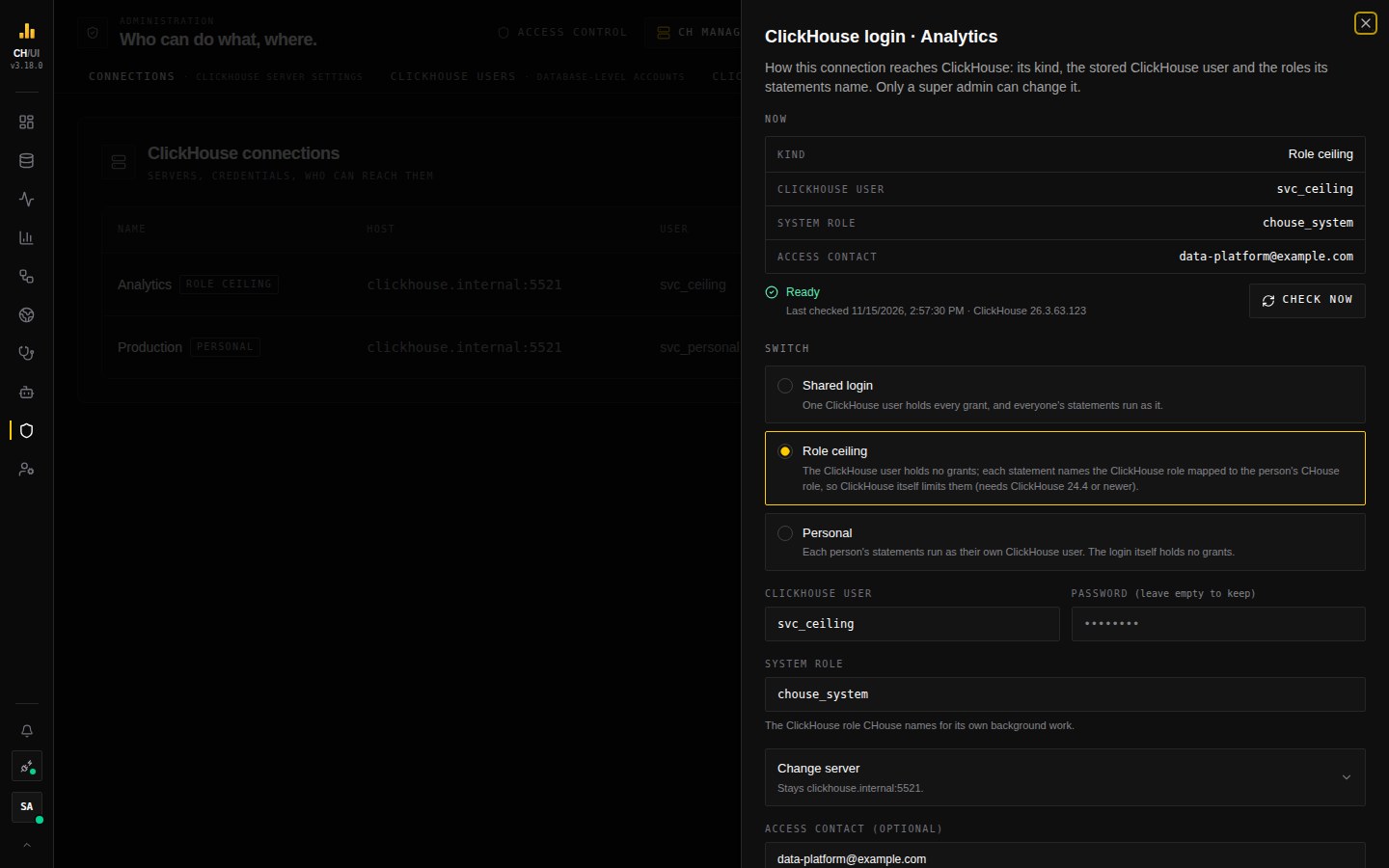 A role-ceiling connection: its kind, user, system role and access contact, with the health line and Check now
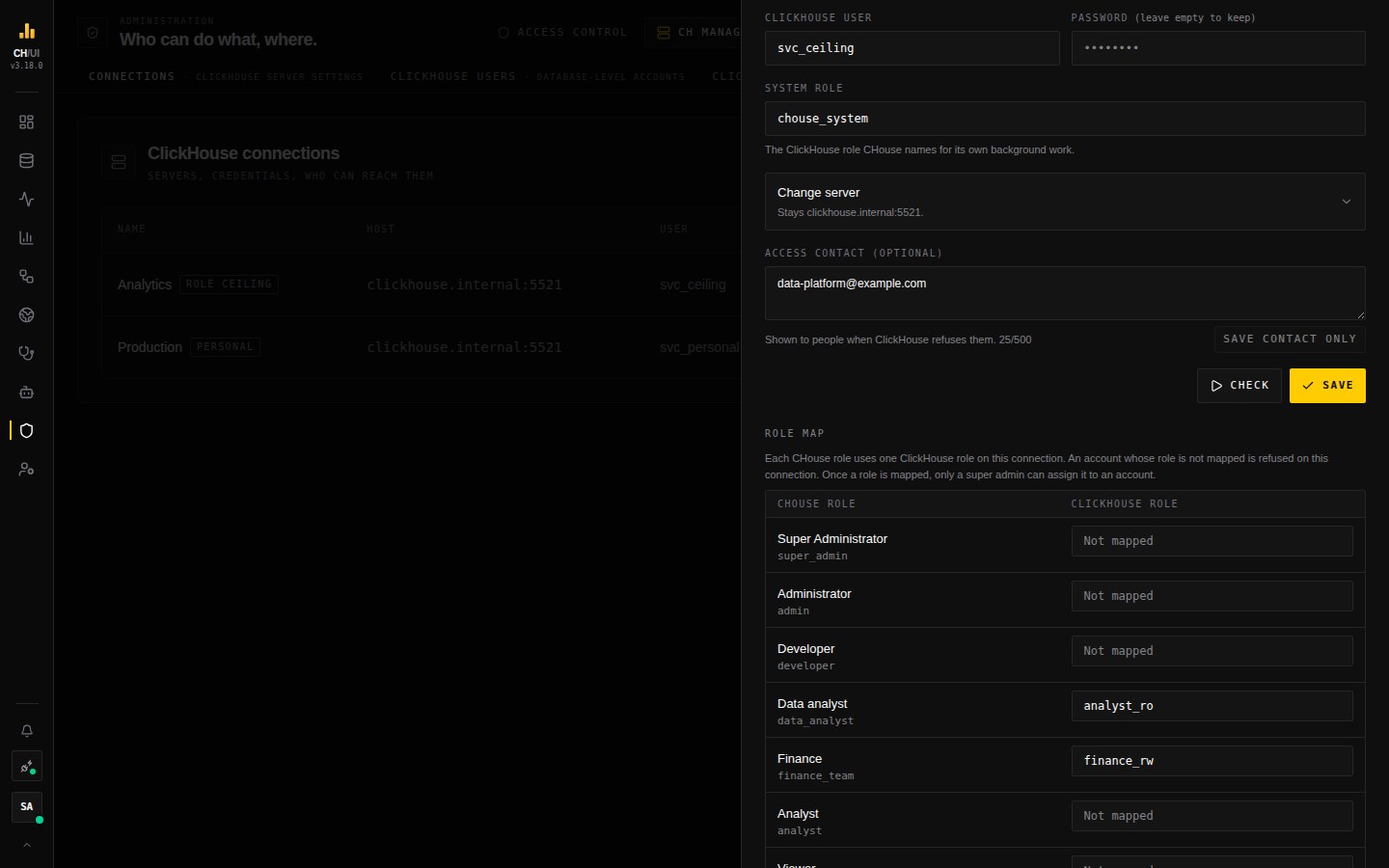 One ClickHouse role per CHouse role; a role that is not mapped is refused on the connection
Monitoring pages need a grant on the role
Live Queries, the query log list and the server's own metrics are read by CHouse UI with the system role, so they work for everyone who has the CHouse permission for them. Many charts and tiles on the Monitoring pages are different: the browser sends their statements like any typed statement, so they run with the person's mapped role. A role with no grant on system tables gets empty tiles there (zeros), not an error.
To give a role's people the Monitoring pages, grant it SELECT ON system.* (or only the tables you want). CHouse UI's own rules still apply on top: reading the statement logs needs query:history:view:all, and the access tables need clickhouse:users:view (Data access rules).
The Explorer lists the databases and tables the role can see in ClickHouse.
Which kinds a server can run
When you open ClickHouse login, CHouse UI asks the connection's server which kinds it can run, and blocks the ones it cannot before you prepare anything:
| Kind | Needs | When the server lacks it |
|---|---|---|
| Shared login | Nothing more | Always available |
| Role ceiling | A ClickHouse role on a request: ClickHouse 24.4 or newer | The option is disabled, with the server's version and what is needed |
| Personal | That, the EXECUTE AS statement, and the self-test | The option is disabled when the server has no EXECUTE AS; the self-test runs when you press Check |
It asks the server itself, with two statements that need no grant, so the answer does not depend on a version list. If the server does not answer, nothing is blocked and Check decides. If you are entering another host under Change server, the block is lifted too: the check asks the new server.
The same holds for the API: a switch to a kind the server cannot run is refused with KIND_UNSUPPORTED_ON_SERVER and that one reason, instead of a list of failed checks.
The kind a connection already has is never disabled, so the login of a connection whose server was downgraded can still be replaced or switched back.
What CHouse UI checks
The checks run before a switch, when you press Check now, and every five minutes. A connection that fails them, or whose last check is more than 15 minutes old, refuses every request until it passes again, and says why.
| Check | Fails when |
|---|---|
| The user holds no grant of its own | SHOW GRANTS lists a direct grant, a default role, or a role WITH ADMIN OPTION |
| Its roles hold nothing that manages or becomes other users | A role (or a role granted to it) can create, alter or drop users, roles, policies, quotas or profiles, holds a grant WITH GRANT OPTION, or can impersonate every user |
| A request that names no role reads no data | Such a request can read system.processes, system.query_log or a table. If the user holds no grant, the server setting select_from_system_db_requires_grant is off |
| The system role can read system tables | The role is not granted to the user, cannot read system.processes, or the server is older than 24.4 |
| No connection of another kind uses the same user | Another connection with the same host, port and user has a different kind. Each kind needs its own ClickHouse user |
| The remediation credential | It can manage users or impersonate |
Only these checks change a connection's health. An error from a statement someone typed never does.
What people see
- The connection switcher shows "Shared login
user, limited to your ClickHouse role". - A statement outside the role is refused by ClickHouse: "Your ClickHouse role on this connection isn't allowed to do this", with the grant ClickHouse named.
- A person whose role is not mapped sees that their role has no ClickHouse role on the connection.
- When you set an access contact on the connection, it is added to these messages, so people know whom to ask.
Who can assign a mapped role
A CHouse role that is mapped on any connection decides what ClickHouse lets its holder do there. Only a super admin can assign such a role to an account, change an account that holds one or reset its password, and edit a role map or change a connection's kind or login. Once any role is mapped, changing the default role SSO gives or a provider's role mapping also needs a super admin. Each change is in the audit log (connection.identity_switched, connection.role_map_changed).
On a role-ceiling connection the host, port, TLS setting, user and password are changed only in the Identity panel, where the checks run again.
For the ClickHouse administrator
Observed on ClickHouse 24.4 and 26.5:
- A view cannot be created through CHouse UI over a table the creator's mapped role cannot read.
- An insert is refused when a materialized view on the target table reads something the inserter's mapped role cannot.
- A view with
SQL SECURITY DEFINERruns with its definer's direct grants, not with roles granted to the definer. One whose definer is the empty user reads nothing. Views whose definer is the previous user keep working while that user keeps its grants. system.query_logstill shows the service user for every statement; the CHouse account is in the query id.- The collectors run with the system role, which has no grant on your tables. Features that read table data in the background (column profiles, for example) report those reads as not permitted.
What the ceiling does not cover
- The bound is the role's grants, not one person's: two people with the same CHouse role reach the same data.
- The remediation credential is a separate ClickHouse user and is outside the ceiling. What it may do is bounded by its own grants and by the approval a remediation action needs.
- An account holds one CHouse role, so it has one ClickHouse role per connection.
Switch back
Choose Shared login in the Identity panel and enter a ClickHouse user that holds the privileges a shared login needs. It must be a different user from the empty one.