
Upgrades
Where your ClickHouse version stands, and what an upgrade changes for your workload: exact against a server on the target line, or from the release notes.
- In the app
- Monitoring › Upgrades
/monitoring/upgrades - Needs
- upgrades:view
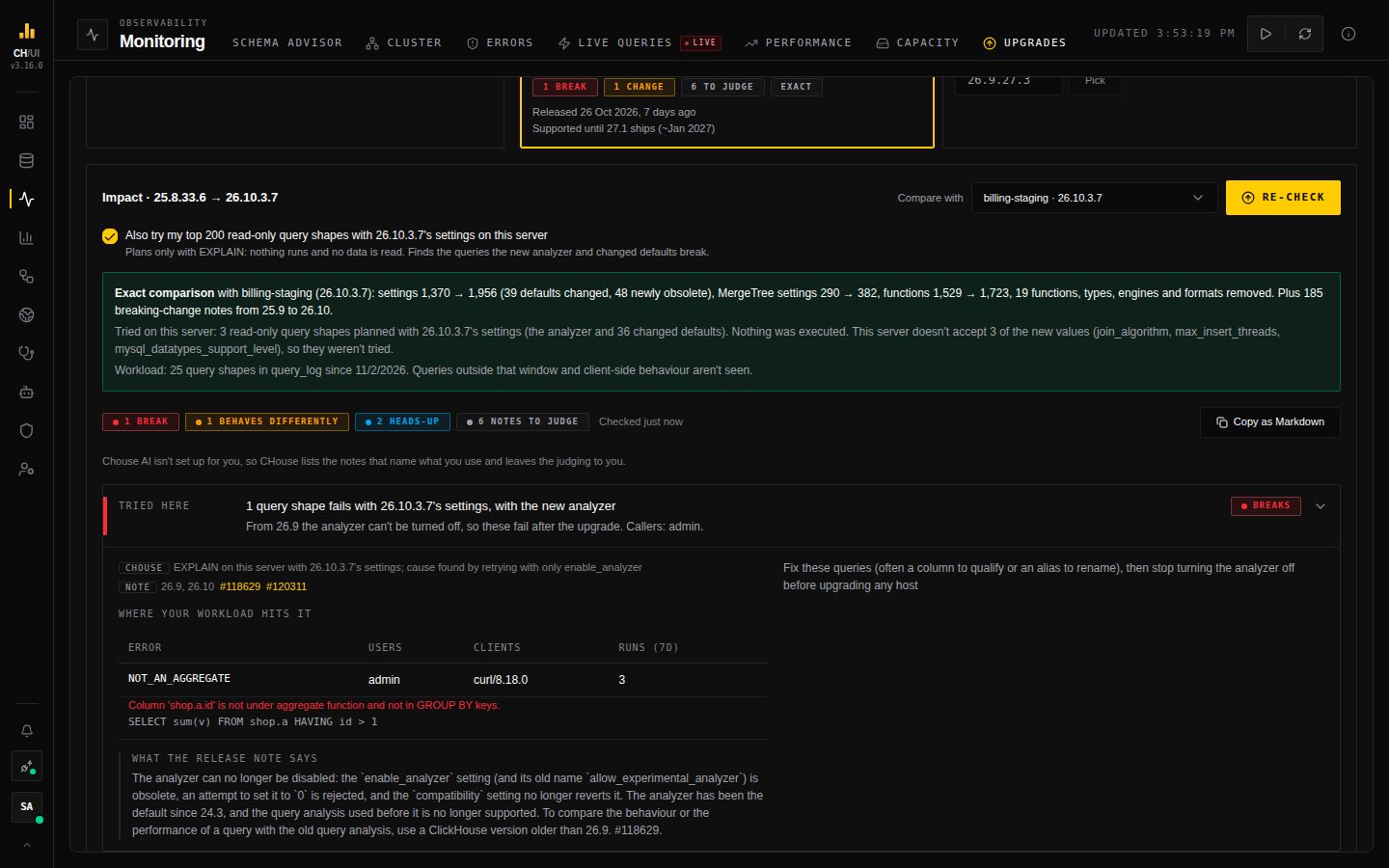
Monitoring › Upgrades shows where the active connection's ClickHouse version stands, which versions are worth moving to, and — when you click Check — what an upgrade changes for your workload: the functions your queries call, the types your columns use, the engines your tables run on, the settings you rely on. CHouse never upgrades anything.
Where you stand
The left card shows the version this connection runs and whether ClickHouse still supports it: the three newest release lines and the two newest LTS lines (months 3 and 8) are supported. It also says when the last patch came out, and when support ended or is expected to end.
Where to go next offers:
- Patch, first, when a newer patch is out on your own line;
- the two newest LTS lines, the newest one Recommended;
- the newest Stable line, which is supported for about three months;
- Other version, for any line or patch you type.
Each card shows the release date of its newest patch, how long it will be supported, and the result of its last check.
Release dates, support and newest patches come from ClickHouse's release list on GitHub and Docker Hub. CHouse only fetches them when UPGRADE_CHECK_ENABLED is on (Helm observability.upgradeCheckEnabled); see Outbound requests.
Check an upgrade
Pick a target, then Compare with:
| Choice | What CHouse compares |
|---|---|
| A connection that already runs the target line | Exact. The system tables of both servers: every setting with its default and whether it is obsolete, MergeTree settings, functions, data types, table engines, formats and database engines. |
| Release notes only | The "Backward Incompatible Change" entries of every release between your version and the target. Notes don't list most default changes: in a test of 25.8 → 26.8 they named 16 of 56. Use a connection on the target line when you can. |
The list offers every connection you can open that runs the target line; it doesn't need to be marked as staging. Click Check (needs upgrades:run). The check reads this server, the comparison server or the notes, and 30 days of query_log, tries your top queries with the target's settings, and shows each step as it goes. It usually takes under a minute.
A change becomes a finding only when your workload uses it:
| Finding | When |
|---|---|
| Breaks | A removed type your columns use, a removed function your queries call, a removed table, database engine or format you use, a query that fails when tried with the target's settings, or a query shape that already got slower on a replica that was upgraded |
| Behaves differently | Setting defaults that change, with the ones your workload sets or a release note mentions listed first |
| Heads-up | Obsolete settings your profiles or queries still set (ClickHouse ignores them), changed MergeTree defaults, a pinned compatibility |
Open a finding to see where your workload hits it (tables, columns, callers and run counts), its sources (Diff, Note with a link to the ClickHouse pull request, or CHouse), what the release note says, and SQL to fix it or to keep today's behaviour. To keep a version's defaults while you test, use ClickHouse's compatibility setting rather than copying old values: a setting's meaning can change with its default. When the default profile lives in users.xml, the snippet is a users.d/ file.
Rows naming a table you can't read under your data access are hidden and counted.
Release notes to judge
Notes that name something your workload uses but that CHouse can't decide on its own, such as request headers or values inside INSERT payloads, are listed under Release notes that name what you use, with a link to each pull request. Notes that only name very common types and engines are counted, not listed.
With Chouse AI
When an AI model is set up and you have ai:optimize, Chouse AI reads the notes against the names your workload uses right after your check, and turns the ones that matter into findings marked Chouse AI. It sees the notes and those names, never rows or tables. A finding is kept only if it cites a note that was sent and names from your workload; anything else is dropped and counted. On an older check, Read the notes with Chouse AI runs it on request.
Copy as Markdown gives the check as a report for a ticket or change request.
What a check can't see
- Queries outside the
query_logwindow, or any if query logging is off. The check says how much it saw. - What clients do: request headers, the values inside INSERT payloads.
- Hosts behind a load balancer, one at a time.
Try it on this server
Also try my top 200 read-only query shapes with the target's settings on this server is on by default. Many of a new version's behaviours already exist on your current server as settings it ships switched off; the new version turns them on. So CHouse plans your most-used read-only queries of the last 30 days on your current server with EXPLAIN, once with the settings each ran with and once with the target's:
- the new analyzer on, which can't be turned off from 26.9 and is what breaks queries most often;
- in an exact check, also every changed default your server already knows.
A query that fails only with the target's settings becomes a Breaks finding, grouped by the setting that breaks it, with the error, its callers and how often it runs. A query that fails today too is skipped. Queries whose plan changes are one Heads-up: they still work, so watch them in Performance after the first host. The coverage line says how many queries were tried, which settings were applied, and any your server refused.
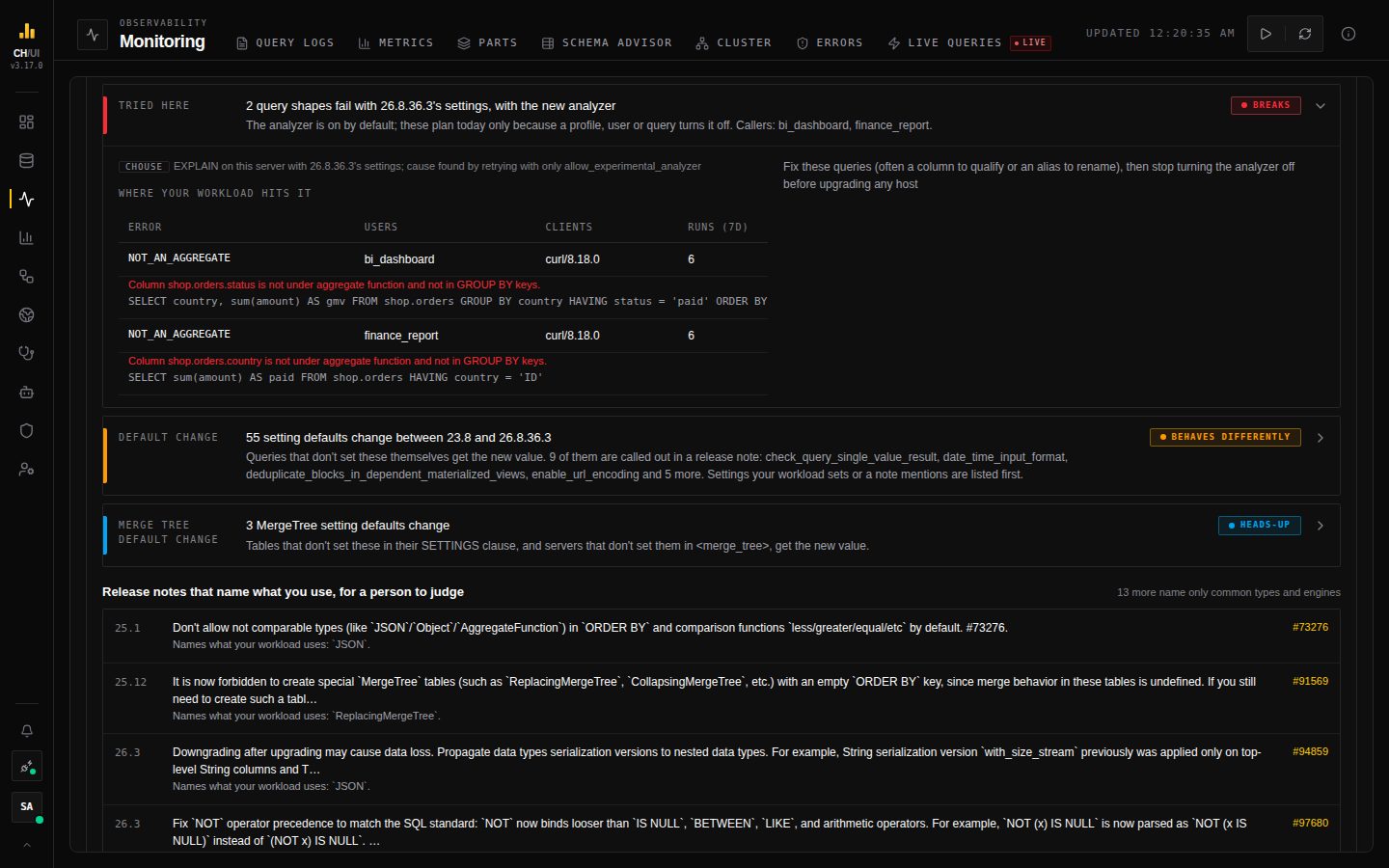 Two query shapes that the new analyzer rejects, with the error, the users and clients that run them, and how often
Nothing is executed and no data is read: every statement is read-only, limited to 10 seconds, capped in rows read, and run one at a time within one minute. The query text is shown only to people with query:history:view:all.
It can't test code your server doesn't have yet, such as a function the target removes (the check's diff and notes cover that), queries outside the top 200, or speed.
Fleet
On the Fleet page, the version on each card turns red when its line is out of support and amber when a newer patch is out. Hover it for the reason and the last check, and click it to open Upgrades for that connection.
Outbound requests
With UPGRADE_CHECK_ENABLED on, CHouse fetches from two fixed addresses only: raw.githubusercontent.com (ClickHouse's release list and changelogs) and hub.docker.com (the newest clickhouse/clickhouse-server tag of each line). Requests use HTTPS, refuse redirects, time out after 10 seconds and are cached for a day. Nothing downloaded is run. With it off, the tab shows the version and the exact comparison only, and the Fleet colour is off.