
Personal connections
Run each person's statements as their own ClickHouse user: which builds qualify, the two roles, links between accounts and ClickHouse users, and what changes.
- In the app
- Admin › Connections
/admin/connections - Needs
- connections:edit
A personal connection runs each person's statements as that person's own ClickHouse user. It is the third connection kind, next to the shared login and the role ceiling.
| Kind | Whose grants decide what a statement reaches |
|---|---|
| Shared login | The stored ClickHouse user's, narrowed by CHouse UI's data access rules |
| Role ceiling | The ClickHouse role mapped to the person's CHouse role |
| Personal | The person's own ClickHouse user |
CHouse UI stores no password for a person's ClickHouse user. The connection's stored login holds no grant of its own; it may only act as the users a ClickHouse administrator allowed, through ClickHouse's EXECUTE AS.
When to use it
Use it when your ClickHouse users, roles, row policies and quotas already say who may do what, and you want CHouse UI to follow them instead of keeping a second set of rules. Each person sees and changes exactly what their ClickHouse user may, and system.query_log shows that user for their statements.
Do not use it when people have no ClickHouse user of their own; the role ceiling fits that case.
Which ClickHouse builds qualify
ClickHouse must have EXECUTE AS, and must check the target user's grants for every statement it runs that way. CHouse UI tests this itself, before the switch and every five minutes after, and refuses a server that fails.
| Build | Result |
|---|---|
| 26.3.63 | Passes |
| 26.5.7 | Refused: it runs CREATE under EXECUTE AS without checking the user's grants |
| 25.10 and older | Refused: no EXECUTE AS |
On a server without EXECUTE AS, Personal is disabled in the ClickHouse login panel, with the server's version, before you prepare a login. The Linked ClickHouse users panel says the same: links there cannot be used until the server is upgraded. A build that has EXECUTE AS but fails the self-test (26.5.7) is refused when you press Check, with the check that failed.
The ClickHouse changelog lists the fix for the unchecked CREATE for 26.10. If you upgrade a server to a build that fails, the connection refuses every request until the server passes again. CHouse UI repeats the CREATE test at most a minute before any statement runs as a person, so an upgrade between two five-minute checks is caught.
Not covered: behind a load balancer whose nodes run different builds, the test can pass on one node while a statement reaches another.
How it works
- The stored ClickHouse user is empty, as on a role ceiling: only roles, none of them default.
- It holds two roles. The system role is for CHouse UI's own reads of system tables. The impersonation role holds one kind of grant,
IMPERSONATE ON <user>, one per linked ClickHouse user. - A super admin links each CHouse account to one ClickHouse user. One account has one link per connection, and one ClickHouse user belongs to one account.
- A person's statement is sent as
EXECUTE AS <their user> <statement>with the impersonation role named. ClickHouse checks that user's grants. - CHouse UI's own work (monitoring, collectors, live queries, stopping a query, the parse of the access check) is sent with the system role, as nobody else.
Set it up
You need a super admin in CHouse UI and an administrator in ClickHouse.
1. Prepare the login in ClickHouse. Admin › Connections › ClickHouse login, choose Personal, and copy the statements shown. They look like this:
CREATE ROLE IF NOT EXISTS chouse_system;
GRANT SELECT ON system.* TO chouse_system;
GRANT SHOW ON *.* TO chouse_system;
GRANT KILL QUERY ON *.* TO chouse_system;
CREATE ROLE IF NOT EXISTS chouse_impersonate;
CREATE USER IF NOT EXISTS svc_chouse IDENTIFIED BY '<password>';
GRANT IMPERSONATE ON svc_chouse TO chouse_impersonate;
GRANT chouse_system, chouse_impersonate TO svc_chouse;
ALTER USER svc_chouse DEFAULT ROLE NONE;
The grant on the login itself lets CHouse UI test the server without acting as a real person.
2. Link accounts. Open Linked ClickHouse users on the connection, pick an account and type its ClickHouse user name. You can do this while the connection is still a shared login; links are not used until the switch. See Link an account to a ClickHouse user.
3. Run the grants. The panel shows one statement per waiting link, for the ClickHouse administrator:
GRANT IMPERSONATE ON alice TO chouse_impersonate; -- ann4. Switch. In ClickHouse login, enter the new user, its password, the system role and the impersonation role, press Check, then Save. Nothing is stored unless every check passes.
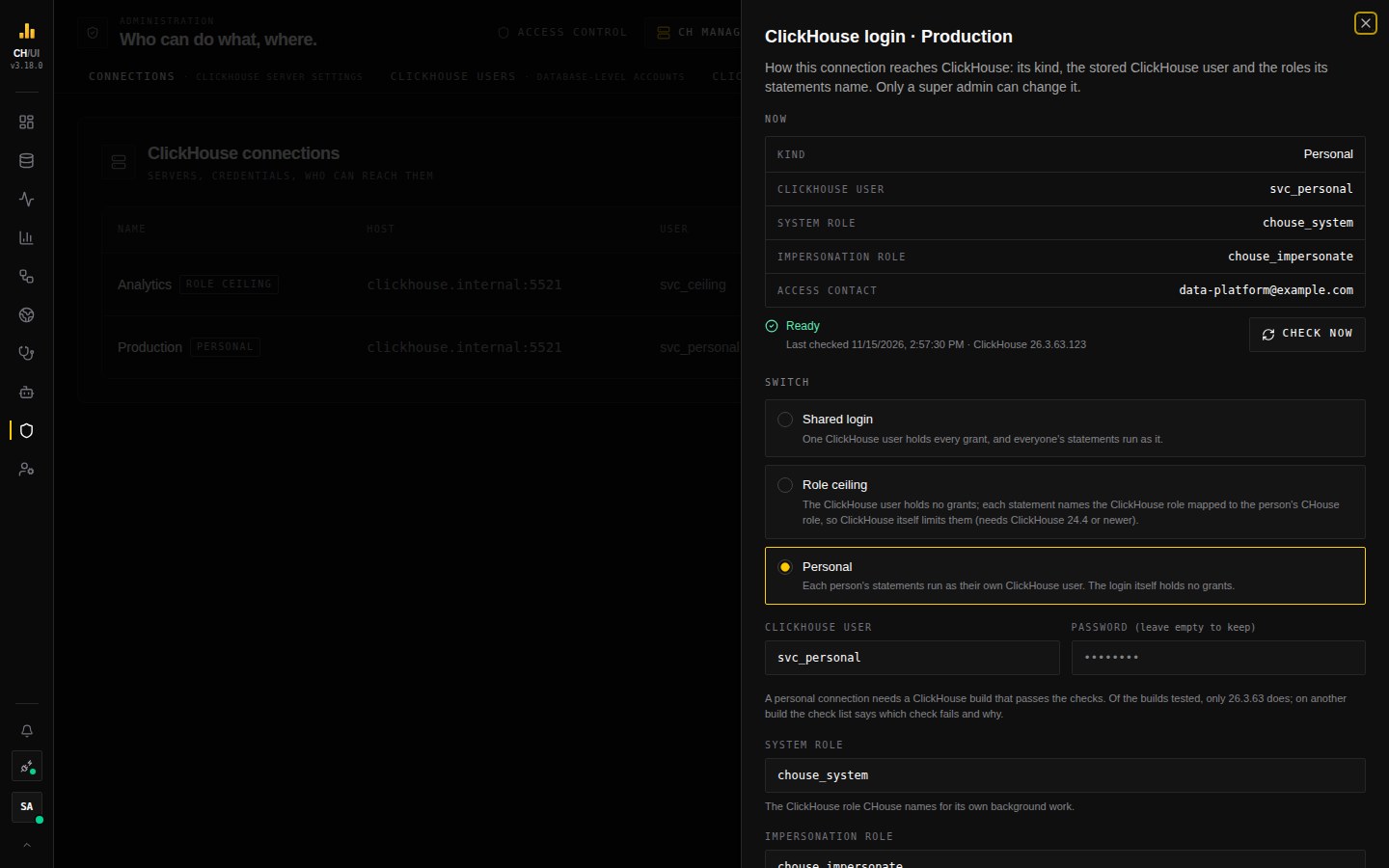 A personal connection: its ClickHouse user, the system role, the impersonation role, and the health line with Check now
What CHouse UI checks
Everything the role ceiling checks, and:
| Check | Fails when |
|---|---|
The impersonation role holds only IMPERSONATE on named users | It holds another privilege or another role, IMPERSONATE on every user, on default, or a grant it can pass on |
| The role can run a statement as another user | The server has no EXECUTE AS, or the role lacks IMPERSONATE on the login itself |
CREATE under EXECUTE AS is checked against the user's grants | The build runs it unchecked |
A FORMAT clause is honoured under EXECUTE AS | The reply has another format |
EXECUTE AS cannot be nested | A nested one runs |
No other role of the login may hold IMPERSONATE.
Links
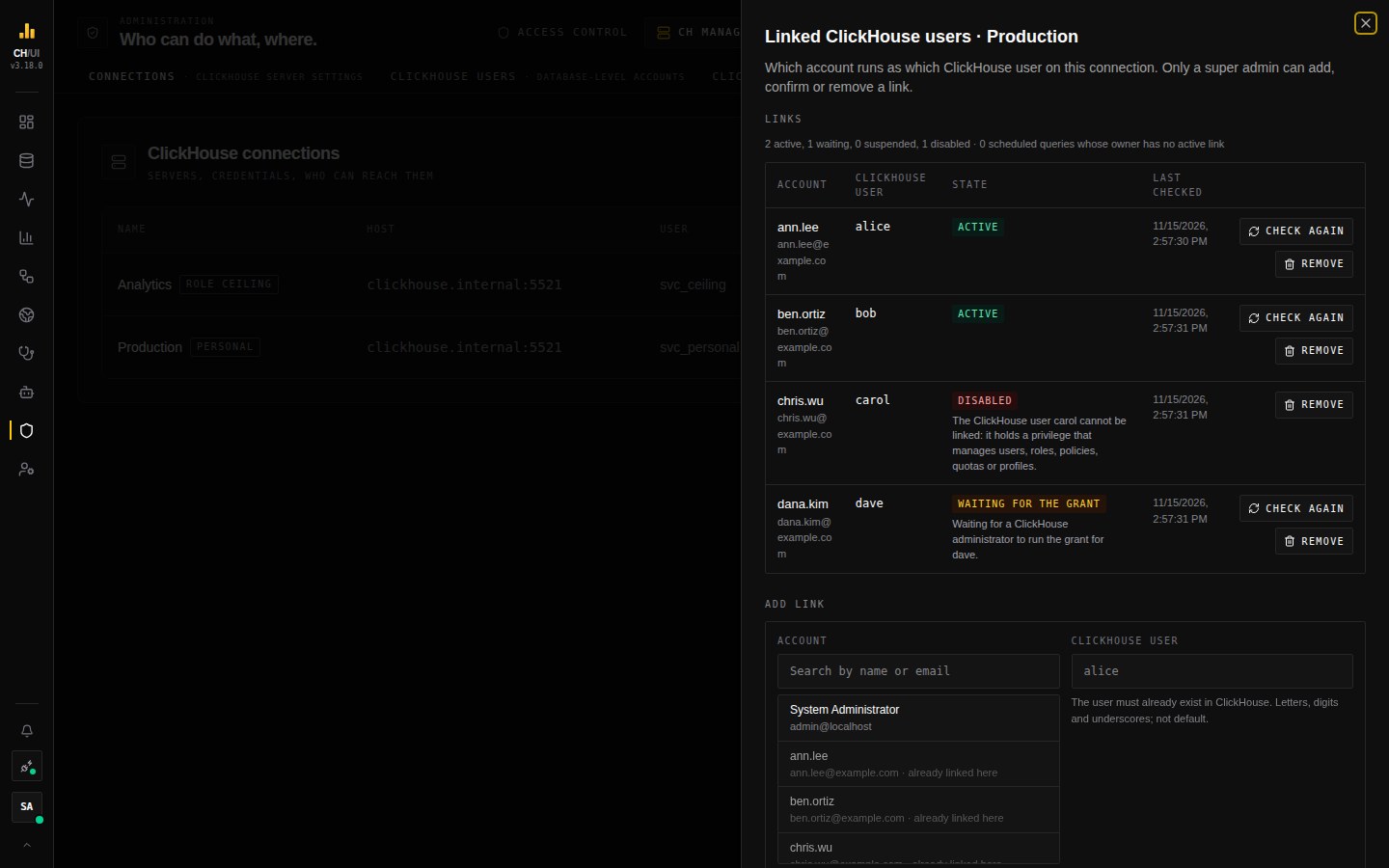 Each account, its ClickHouse user and the state of the link, with the reason when a link is not active
| State | Meaning | What changes it |
|---|---|---|
| Waiting for the grant | The link exists; ClickHouse does not yet let the connection act as the user | The grant is run, then the next check or Check again |
| Active | The account's statements run as the user | — |
| Suspended | How the account signs in changed, and its holder did not do it | A super admin presses Confirm |
| Disabled | The ClickHouse user was dropped, was dropped and created again, or now holds a privilege a linked user may not hold | A super admin removes the link and creates a new one |
A link is suspended when someone else resets the account's password or changes its email, when a sign-in identity is added to or removed from the account, and when the account is reactivated. Whoever signs in next may not be the person the link was made for.
A ClickHouse user cannot be linked when its name has characters other than letters, digits and underscores, when it is default or the login of a connection, or when it (or a role it holds) can manage users, pass grants on, or act as another user. ClickHouse administrators therefore cannot be linked.
IMPERSONATE is granted on a user name and stays after a link is removed. The panel lists users the connection may still act as that no link uses, with the REVOKE for each.
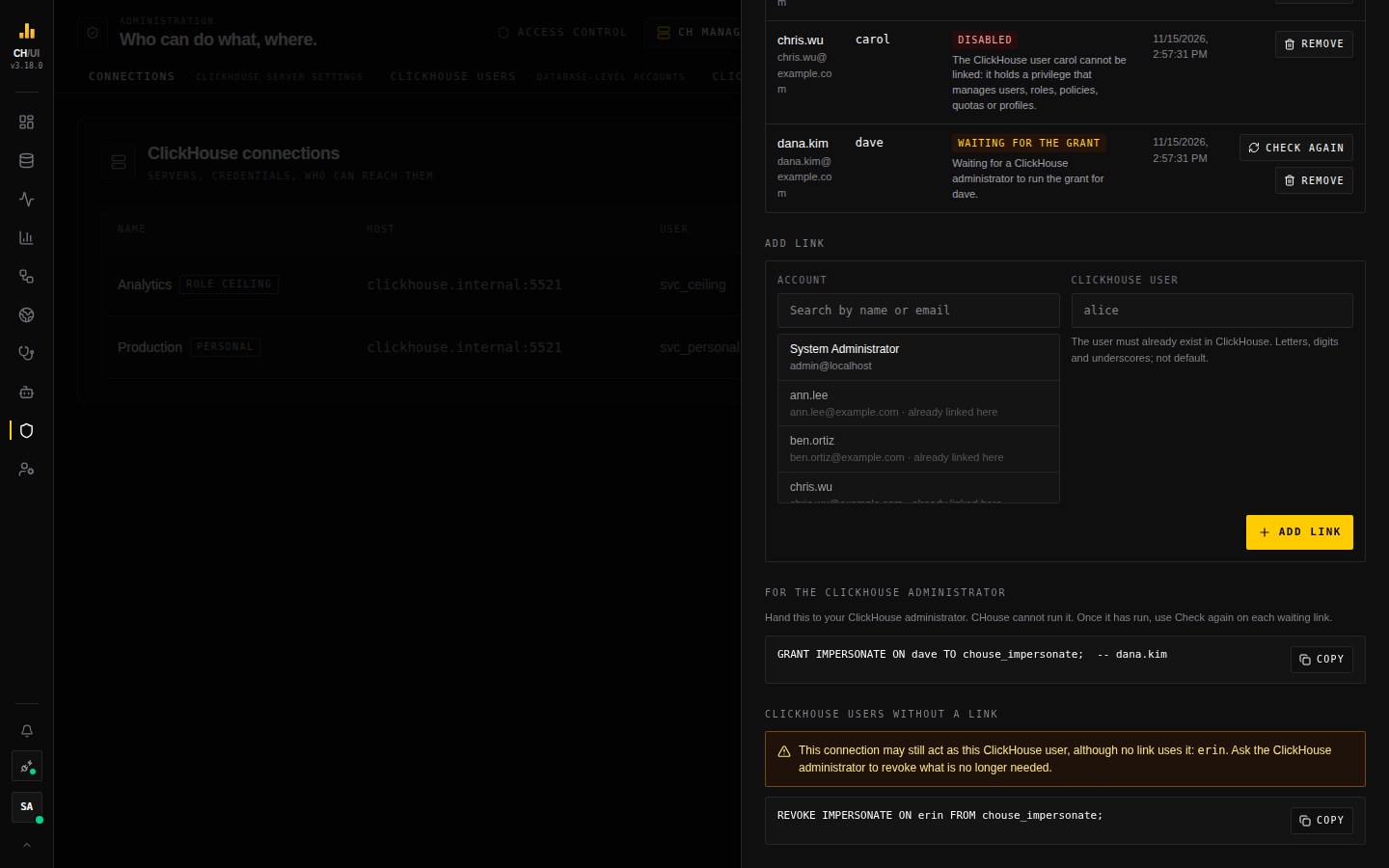 The GRANT to hand to the ClickHouse administrator, and the REVOKE for a user the connection may still act as
Each person sees their own links and their state in Preferences, and from a terminal with chouse connection runs-as. A super admin can list, add, re-check and remove links with the CLI; confirming a suspended link stays in the UI.
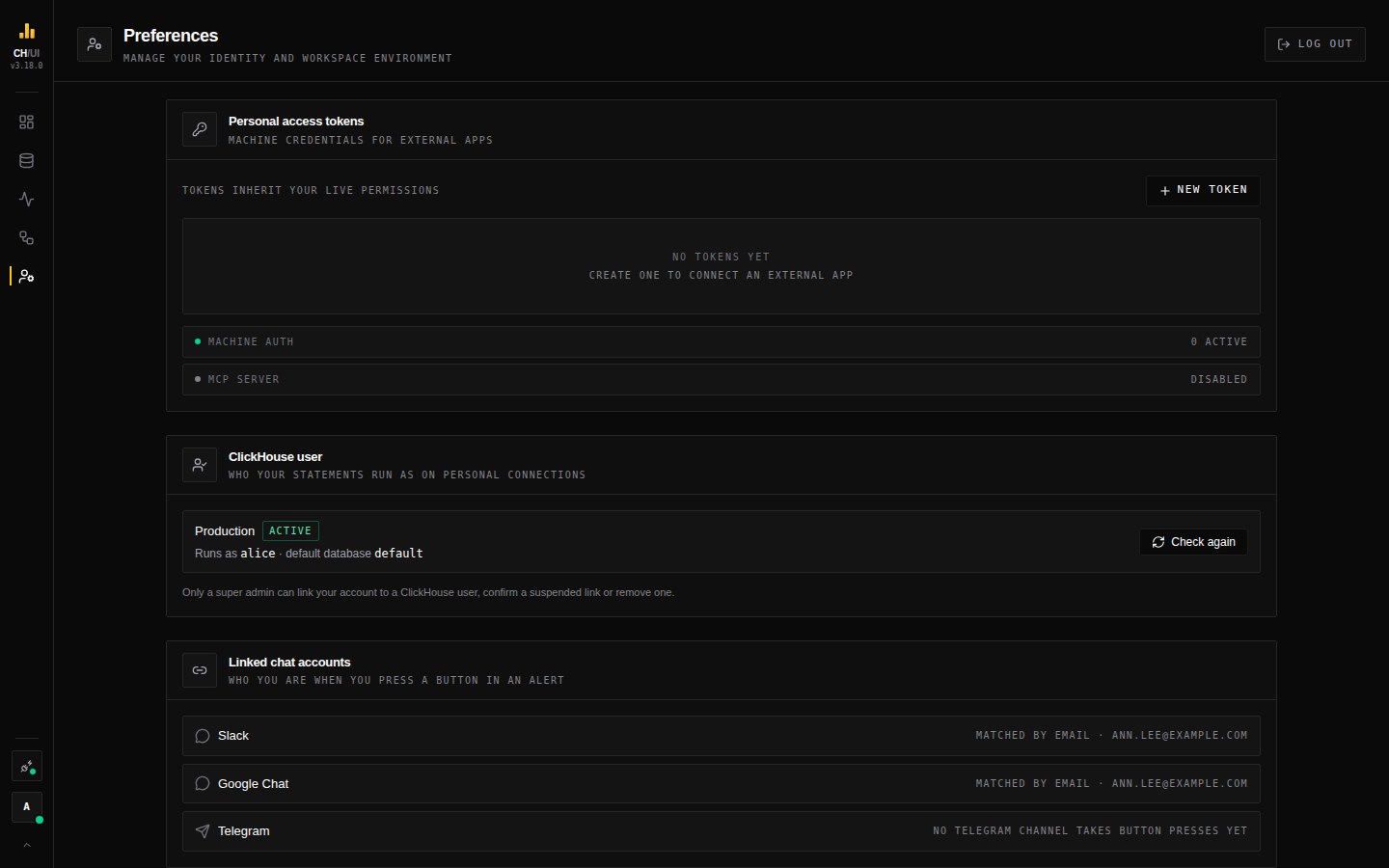 Preferences: which ClickHouse user your statements run as on each personal connection
What changes on a personal connection
- Data access rules do not decide what a statement reaches. The person's ClickHouse user does. Rules still limit which collected monitoring evidence a person sees. CHouse UI permissions for the kind of statement (select, insert, DDL) still apply.
- A statement is one request.
SETandUSEare refused, because there is no session to keep their effect: put settings in the statement's ownSETTINGSclause and write the database in front of the table name. Unqualified names resolve in the person's own default database. INSERT … VALUESis refused. Import rows as a file from the explorer, or useINSERT … SELECT.- A typed
FORMATclause is refused. CHouse UI chooses the output format. - Only statement kinds on a tested list run:
SELECT,SHOW,DESCRIBE,EXISTS,CHECK,EXPLAIN,INSERT … SELECT,ALTER,UPDATE,DELETE,CREATE,DROP,TRUNCATEandKILL. Anything else (SYSTEM,GRANT,OPTIMIZE,RENAME) is refused for everyone, administrators included. - Reads are sent as reads. A
SELECTorEXPLAINcarriesreadonly = 1in its ownSETTINGSclause. A dashboard panel, a notebook cell and a scheduledSELECTmust be reads; a write there is refused. - Scheduled queries and alerts run as their owner's ClickHouse user. A run whose owner has no active link is refused and recorded with the reason. Materialize (an output table) is not available.
- File import goes in as the person. In
system.query_logthe insert itself appears under the connection's login; the person is in its query id. - ClickHouse users and roles cannot be managed from CHouse UI.
- Background reads of table data by collectors (column profiles), and the upgrade check's replay of other people's statements, do not run: CHouse UI's own work reaches system tables only.
What ClickHouse logs
One statement makes two rows in system.query_log. The outer row has CHouse UI's query id (chouse:p:<account>:…), the connection's login and the text starting with EXECUTE AS. The inner row has user set to the person's ClickHouse user, authenticated_user set to the connection's login, and a query id the server made.
For the ClickHouse administrator
- The login can do nothing by itself. A request that names no role reads nothing.
- With the impersonation role it can act as exactly the users you granted, with their grants, row policies and quotas. Revoke the grant to stop it for one user at once.
- CHouse UI never sends an
EXECUTE ASthat a person typed, and never one for a user other than the person's linked user: ClickHouse parses each wrapped statement first, and CHouse UI sends it only when the parse shows that user as the target and the person's statement unchanged under it. - A super admin in CHouse UI decides which account is linked to which of those users. Grant
IMPERSONATEonly on users you accept being used through CHouse UI.
Switch back
Choose Shared login or Role ceiling in the same panel and enter a login for that kind. Links stay, unused, until the connection is personal again.