
Personal access tokens
Mint ch_pat_… tokens in Preferences to authenticate the CLI, MCP agents and CI — scoped, revocable, verified live — and manage the agents you connected by signing in.
- In the app
- Preferences › Personal access tokens
/preferences
Personal access tokens (PATs) let the CLI, MCP agents, scripts and CI act as you without a browser. They look like ch_pat_… and are sent as Authorization: Bearer ch_pat_….
Create a token
- Preferences › Personal access tokens › New token.
- Give it a name that says where it's used (
nightly-report,cursor-agent). - Pick an expiry — 7, 30, 60 or 90 days, a custom date, or no expiry.
- Optionally narrow its scopes to a subset of your permissions. Scopes can only narrow what you can already do, never widen it.
- Copy the token. It is shown once; CHouse UI stores only a hash.
How a token is checked
- A token carries your identity, not a frozen copy of your rights: every call checks your current roles, intersected with the token's scopes. Removing a role, deactivating you or revoking the token takes effect on the next call.
- A scoped token is refused, with 403, on anything outside its scopes. That includes administration: a token scoped to
table:selectcannot list users or roles, even when you can. - An administrator's scoped token is checked for the kind of statement it runs, like anyone's: scoped to
table:selectit cannot run DDL. Data access policies still do not restrict an administrator's token. - A scoped token does not act as an administrator. If you are an admin or a super admin, your scoped token gets none of what the role alone allows: seeing other people's dashboards or scheduled queries, approving high-risk actions, assigning the super admin role, or changing a connection's kind, role map or links. Use a browser session, or a token without scopes, for those. It still reaches the same connections you do.
- Data access policies apply exactly as in the UI.
- Tokens are independent of browser sessions; signing out doesn't affect them.
- Every MCP tool call is audited with the token's user, and agent activity appears on AI Governance.
Rotate and revoke
From the token's menu: Rotate token issues a new secret for the same token (update wherever it is used), Revoke token stops it immediately. Both are recorded in the audit log (pat.rotate, pat.revoke).
Tip: Create one token per consumer — each CI pipeline, each agent — with the smallest scopes and a sensible expiry, so you can revoke one without breaking the others.
Connected apps
Agents you connected by signing in are listed above your tokens. Each works on MCP only, with your live permissions, until it expires or you revoke it. The wrench sets its write tools, the bin revokes it at once (oauth.grant_revoke). Signing the same agent in again replaces its earlier access.
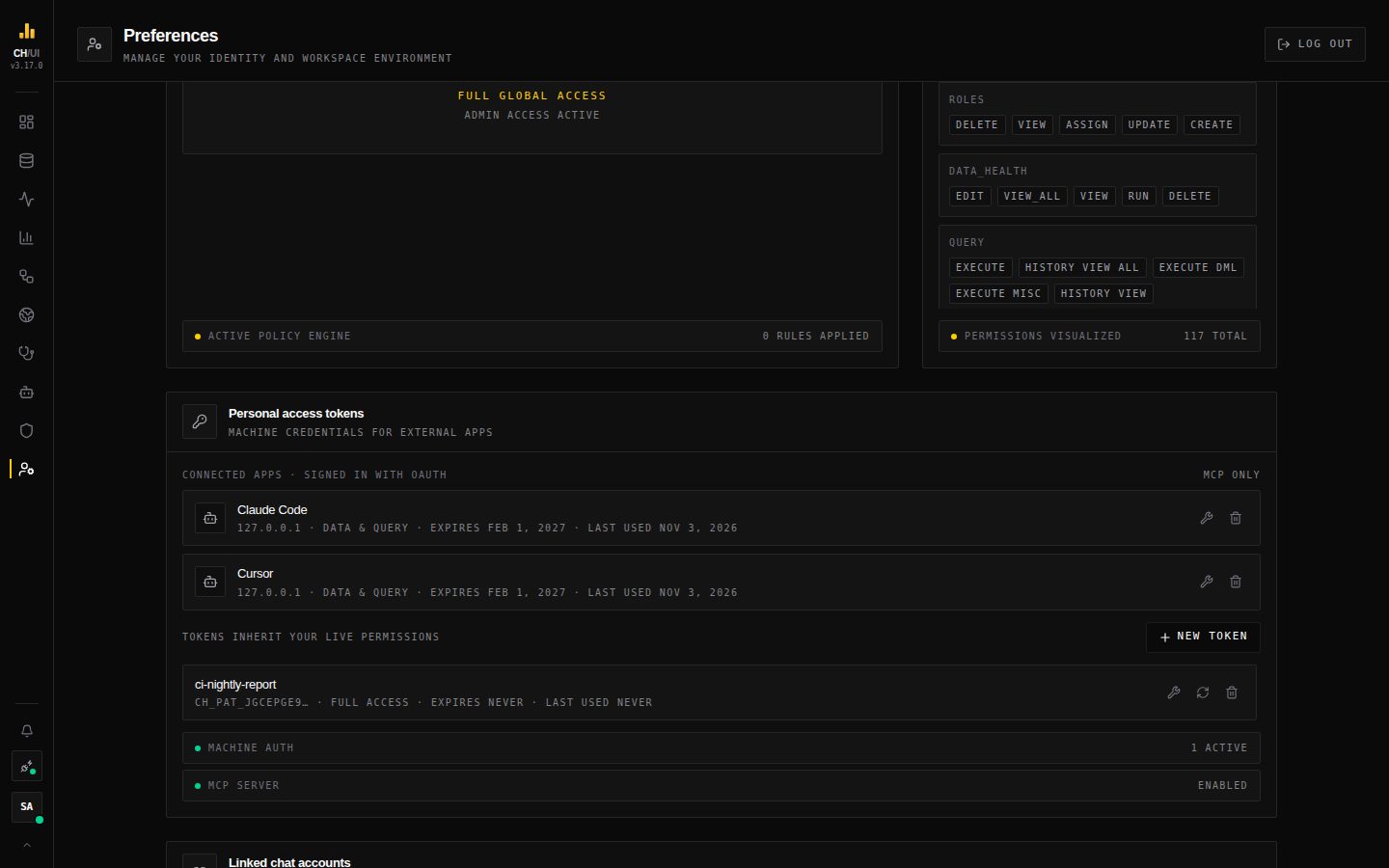 Two agents signed in with OAuth, each with its write tools, expiry and last use, above a personal access token
Where tokens are used
| Consumer | How |
|---|---|
| CLI | chouse auth login prompts for it (or --token-stdin in CI) |
| MCP agents | Read from the CH_HOUSE_PAT environment variable or a secret prompt in the client config — or skip the token and sign in |
| Scripts | The same /api/* endpoints the UI uses, with the bearer header |
Treat a token like a password: it can do whatever its scopes and your roles allow.